A top find is what survives three cuts
Lists of top finds are other people’s shortlists. Here is how to make your own from the CNFans Spreadsheet: save widely, then cut three times, at the card, at the listing and at the warehouse, inside two limits you set before you start.
Why this site never numbers its finds
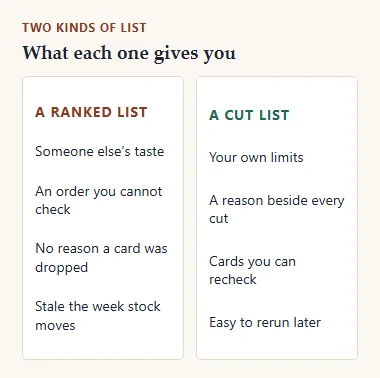
Search for top finds and you get numbered lists: ten jackets, twenty trainers, a top pick for the month. They are easy to read and impossible to check. Number one for whom? For a buyer with your shoulders, your budget, your postage to pay and your patience for a three-week wait?
So this guide does not number anything. A rank needs evidence that applies to everyone, and nothing about clothing bought from overseas works that way. What does apply to everyone is the method: save widely, then cut for reasons you can write down. Two people can run the same cuts on the same rack and keep different cards, and both lists are right.
When you read anyone’s top finds, including a friend’s, treat them as a longlist you did not have to build. Run your own cuts on them before you spend.
Saving a longlist without regret
The first job is to save more than you will buy. Browse two or three racks, save every card that makes you stop, and do not judge yet. Fifteen to twenty-five cards is a comfortable longlist for one parcel; past forty, most people stop reading them properly.
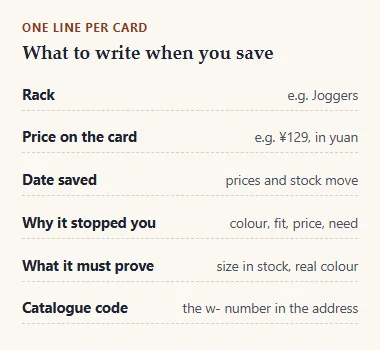
Write one line beside each card as you save it: the rack, the price on the card, the date, and why it caught your eye. “Good colour”, “cheap basic”, “like my old one”. That line is what makes the cuts quick later, because it tells you what the card had to prove.
Keep the list in one place, whether that is a notes app, a photo album of screenshots or a paper notebook. A longlist spread across three apps never gets cut; it just gets abandoned. The hard part, deciding what to buy, comes later and goes faster when everything sits together.
Cut one: the card
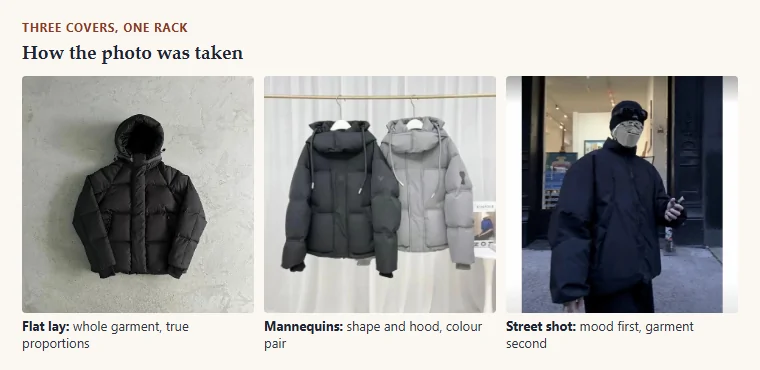
The first cut uses only what the card shows. Look at how the photo was taken. A flat lay or a hanger shot shows the whole garment, its proportions and its seams. A mannequin shot shows the shape. A street or mood photo shows a person, a filter and a pose, and the item may be half out of frame.
Mood shots are not a reason to cut on their own, but they are a reason to demand more from the listing. If the listing photos are mood shots too, the seller is selling an impression, and you will be judging the real piece for the first time in the warehouse photos. That is late, and it is expensive if the answer is no.
Cut a card here if you cannot tell what you would receive: how long it is, where the pockets sit, whether the print is on the front or the back. Keep it if the cover answers those questions, even roughly.
Cut two: the listing
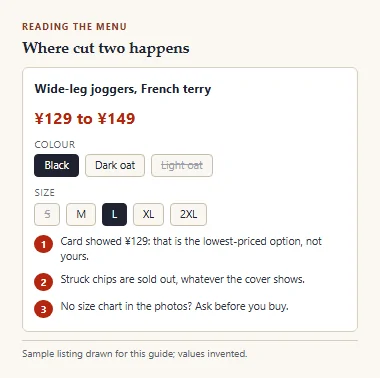
The second cut happens on the listing itself, and it is where most cards fall. Open the option menu before anything else. Is your size there, and is it available, or greyed out? Is your colour named the way the cover showed it? Sellers often photograph the full range and stock only part of it.
Then check the price. The price on a card is very often the lowest-priced option in the menu, so the colour or size you actually want can cost more. When we opened a perfume listing on 20 October 2026, its single price sat next to an option menu headed 款式, the word for style or version, and that menu is where a different price would show up.
Finally, scroll every listing photo. Size charts, fabric labels and close-ups often sit near the end. If the chart is missing, a card can still survive, but it now needs a question to the seller, and that goes on your notes.
Text printed on a cover is evidence
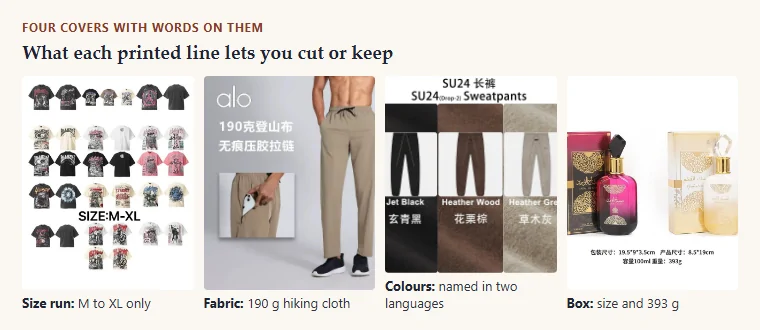
Some sellers print the facts straight onto the cover photo, and those words are worth more than the picture. On 20 October 2026 we opened four covers that did exactly that. A tee listing printed “SIZE:M-XL”, so anyone needing an S or a 2XL could cut it on sight. A pair of joggers printed 190克登山布, a 190-gram hiking fabric. A sweatpant cover set its three colours side by side with names in Chinese and English. A perfume cover printed its box size and weight.
Treat these as the seller’s claims, not measurements. They still beat a bare photo, because a seller who writes down a fabric weight or a size run has given you something to hold them to when the warehouse photos come in.
Cut three: the warehouse photos
The last cut happens after you have paid for the item, when it reaches the CNFans warehouse in China and staff photograph it. This is the first time anyone working for you has seen the real piece, and it is still cheap to say no: a return or exchange inside China costs far less than one from your doorstep.
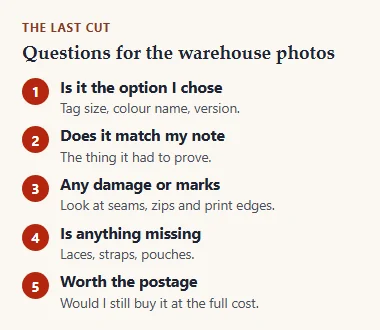
Hold the photos against the notes you wrote when you saved the card. You wrote down what it had to prove, so check exactly that: the size on the tag, the colour against the cover, the print where the cover put it. Our warehouse photo page has the full checklist.
The two limits: budget and parcel
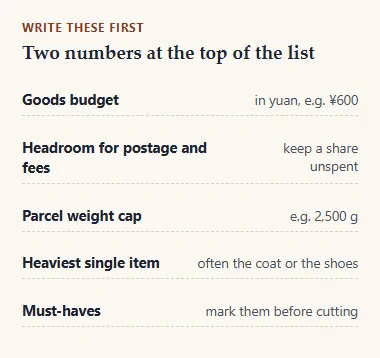
Set two numbers before you start cutting, and write them at the top of the list. The first is a budget in yuan for the goods, with room left over for postage and fees you cannot know yet. The second is a parcel weight you are willing to pay to post, because international postage climbs with every extra few hundred grams.
The limits change what a top find is. A heavy winter coat may beat everything on looks and still lose to three lighter pieces once the parcel weight is set. That is not a failure of the coat; it is the parcel telling you what it can carry this time. Our trimmer does this sum for you and shows its working.
Five habits that stall a longlist
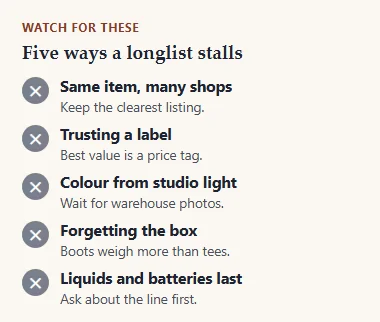
A few habits stop longlists from ever becoming orders. The most common is saving the same item from several shops and never comparing them, so all of them stay. Pick the one with the clearest photos and the fullest size chart, and cut the rest.
Others: trusting a “Best value” label without reading the option menu; choosing a colour from a cover shot under studio light; forgetting that a pair of boots in a box can weigh more than three tees; and adding a perfume or a gadget at the end without asking whether a shipping line will take it. Each one is easy to avoid if you know to watch for it.
Finally, watch the clock. Stock moves, and a card saved three weeks ago may have lost your size. Recheck the menu on the day you order.