
A saved card’s journey to your letterbox
Follow a saved shortlist through CNFans’ nine official actions. Keep the option, payment, purchase, warehouse decision and parcel release separate, so an unresolved item does not slip into the shipment.
Kit to gather for order one
Check service availability first. The 20 October 2026 check found a maintenance notice on cnfans.com. Prepare your list now, but confirm account access, available payment methods and current instructions before paying when service is available.
Bring three things to the first order. Your longlist, already cut at the card and the listing. Your two limits, a goods budget in yuan and a parcel weight. And your measurements: chest, waist and inside leg in centimetres, taken from clothes you already own and like. The measurements save more orders than anything else on this page.
Watch the official CNFans walkthrough · 1:37
Historical official demonstration, 2025. The text and images below explain the nine steps. Payment methods, platforms, prices, storage counters and offers shown in the video are not current promises.
Open the original video ↗1. Search for the seller’s product
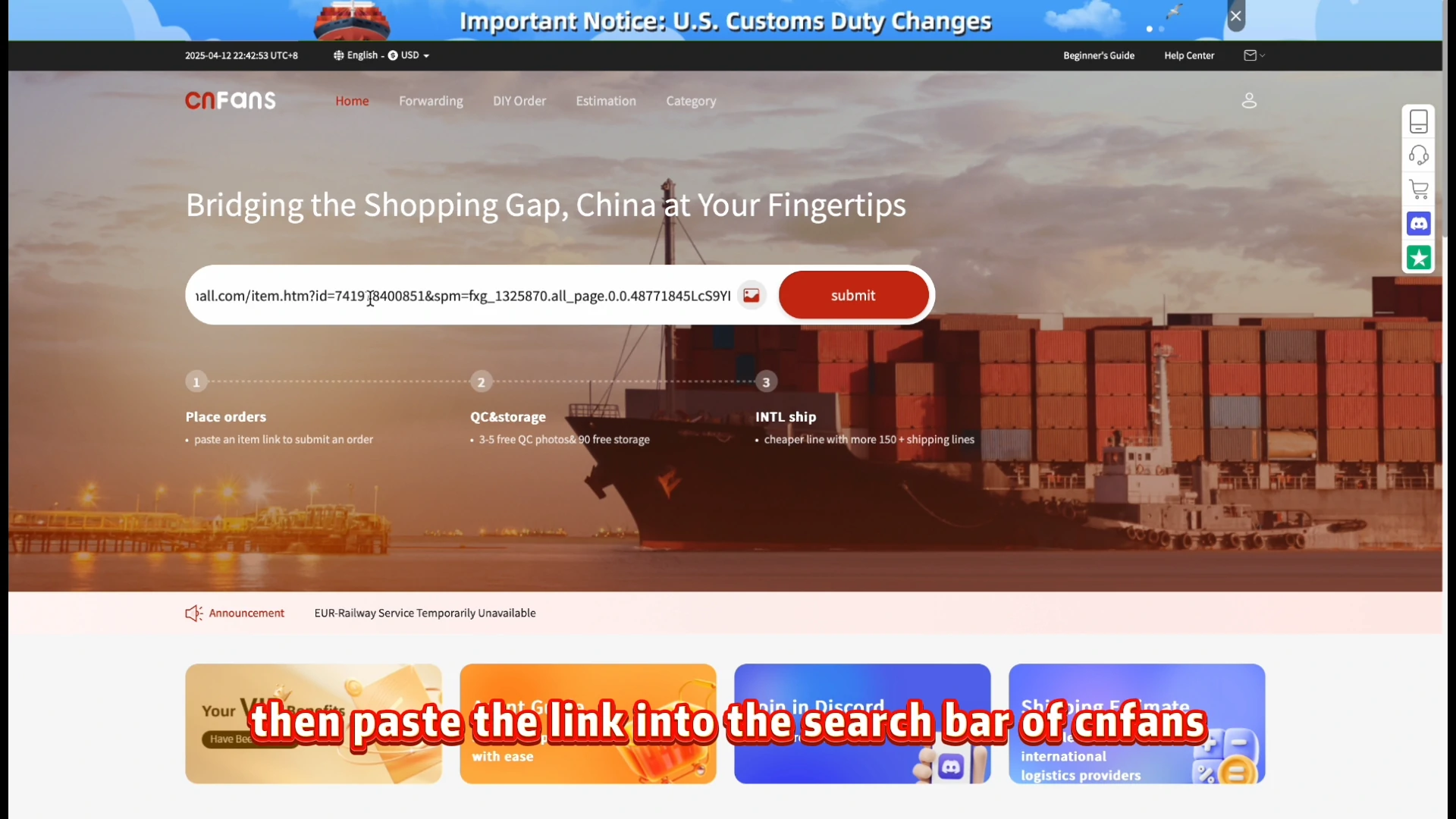
Start with the original seller URL, then paste it into CNFans’ product search. The historical demonstration uses the search field and Submit. Confirm that the result is the same seller and item; a similar photo or a catalogue card is not enough to identify the listing.
Decide colour and size on the seller’s listing, not on the catalogue card. Write down the option names exactly as the menu shows them, Chinese included, because those are the words the agent will use when it buys. If the menu says 深燕麦 and you write “dark beige”, you have added a translation step where mistakes creep in.
Capture the menu on screen with your option highlighted and file the image with your notes, along with the catalogue code from the card’s address. If the listing changes later, the screenshot shows what you agreed to buy.
2. Confirm the option and submit the item
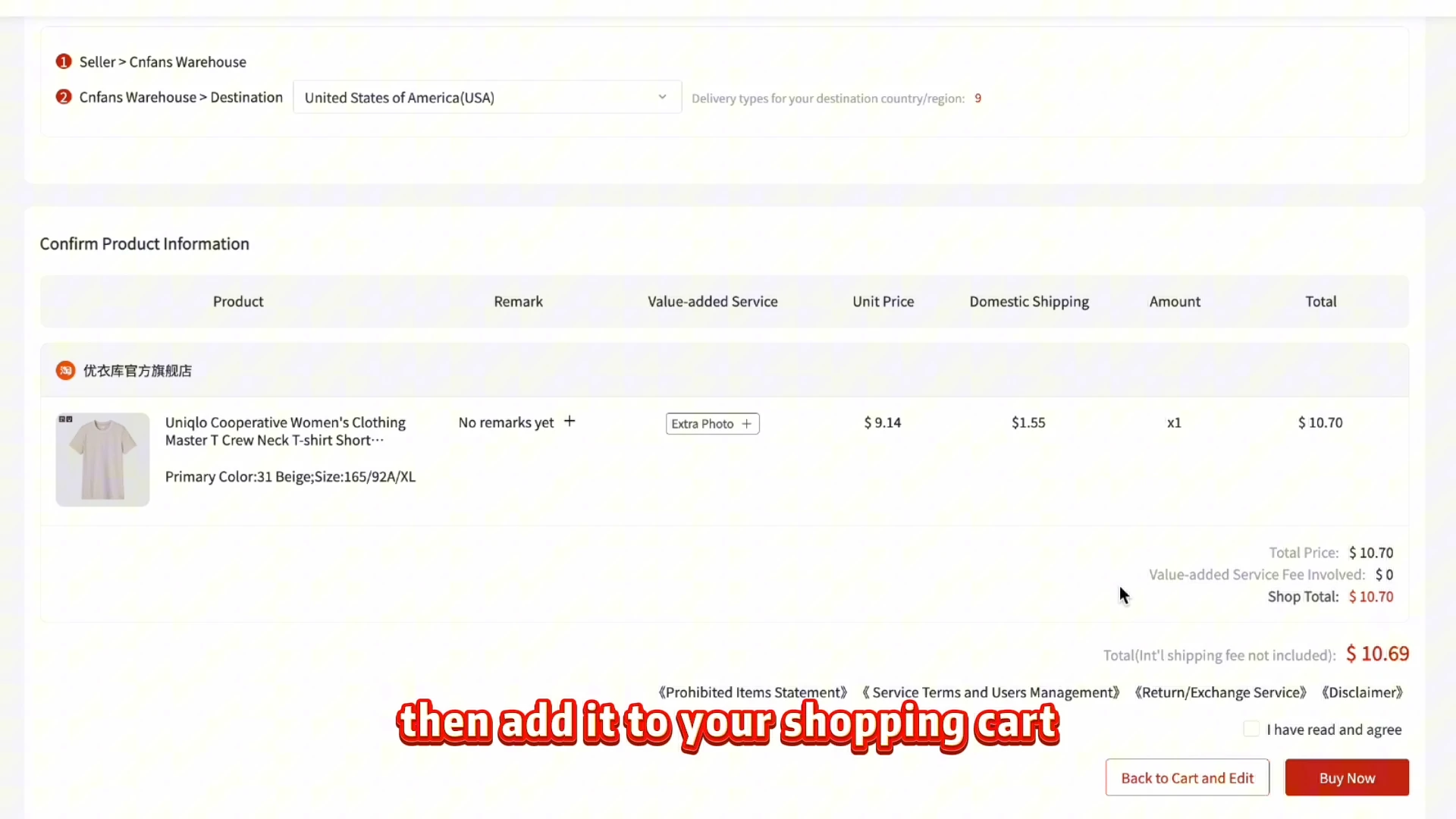
Choose the exact colour, size, version and quantity. Add the item to the cart or use the purchase action, then review the order summary, domestic postage, remark and any extra service. In the example, Back to Cart and Edit returns to the selection and Buy Now continues; neither means payment has succeeded.
Check the price of your option, not the headline price. And check stock on the day: a size that was there when you saved the card may be gone.
If the menu has a heading you cannot read, such as 款式, open each choice before deciding. That heading means style or version, and behind it can sit a different cut, a different print or a bundle, each at its own price.
Keep the listing URL, exact option and quantity together. Where an order note is available, ask a specific question, such as “please confirm the flat chest measurement for this selected size”. Do not substitute “the third photo” for an option name: galleries can change order. Confirm any paid extra service separately.
3. Pay the goods order, before international freight
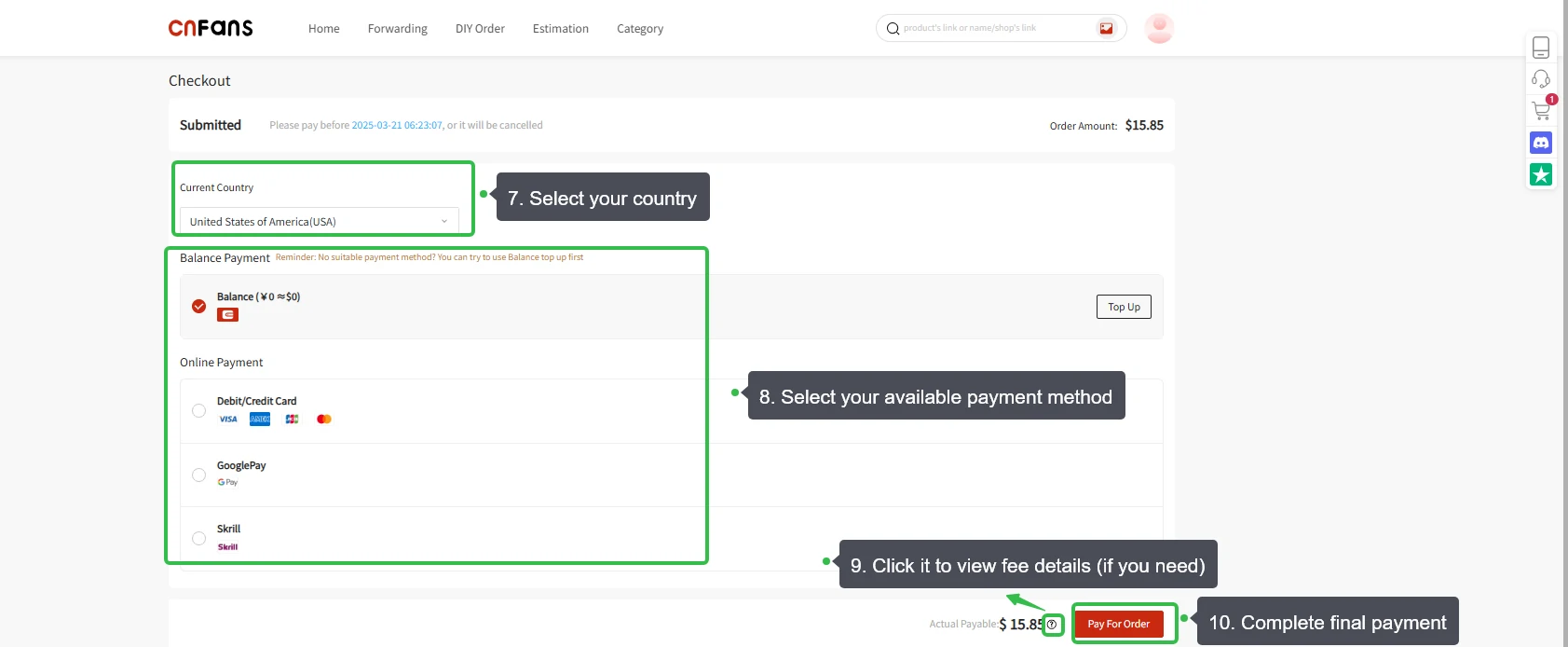
This payment is for the goods order, including domestic postage and any displayed service charges. International freight is a later decision. Check the destination, offered payment method, currency conversion and final payable amount before paying; keep the actual confirmation and order reference.
The agent then shows you a total for this stage: the item price, the seller’s delivery fee to the warehouse, and any buying fee. Read it before you confirm. If the item price differs from the listing, ask why before paying; sellers sometimes change prices between your visit and the agent’s.
4. Check the agent’s purchase in Orders
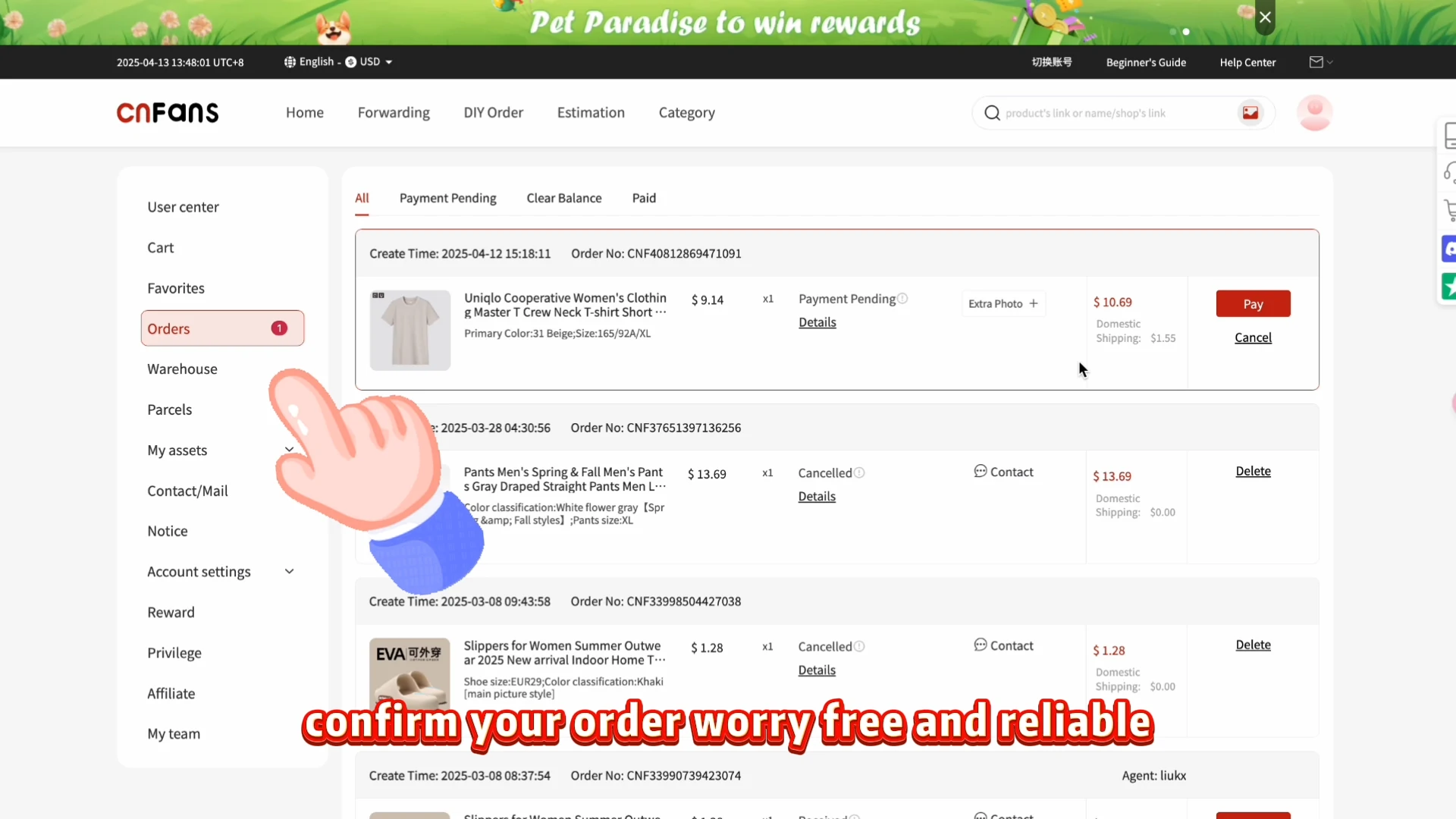
Open Orders and read the item’s real status and any message from the purchasing agent. Paying the order, the agent accepting it and the seller purchase being completed are separate events. Payment Pending is not a completed purchase, and Cancelled is not proof that a refund has arrived.
If an option is unavailable, read the agent’s message before choosing an alternative, waiting or requesting cancellation. Ask where an approved refund will go and follow its actual transaction status. A missing reply is not permission to substitute an item.
5. Follow the seller’s delivery to the warehouse
After purchase, the seller sends the goods to the CNFans warehouse in China. Check seller dispatch and domestic tracking separately from the payment date. A courier delivery scan does not by itself mean warehouse intake or QC is complete. If a line is partially delivered, ask which items the seller parcel contained.
Your first payment covers the goods and their trip to the warehouse. After that, the seller has to pack and post, which usually takes a few days and can take longer around holidays or for items made to order. Listings marked 预售 (pre-sale) are made or restocked later, so read the dispatch line on those before buying.
6. Inspect the Warehouse record and QC photos
After intake, find the received item in Warehouse and open its available QC images. Compare the paid option, quantity, label and requested measurement with the evidence shown. A photograph cannot settle a hidden detail or guarantee authenticity, performance or fit. Ask about missing views and resolve a mismatch before international shipment.
After warehouse intake, match each item record and available photo to your paid option. A wrong size tag, colour or print is a reason to ask for review before international shipment. Return eligibility still depends on the seller, deadline and item condition.
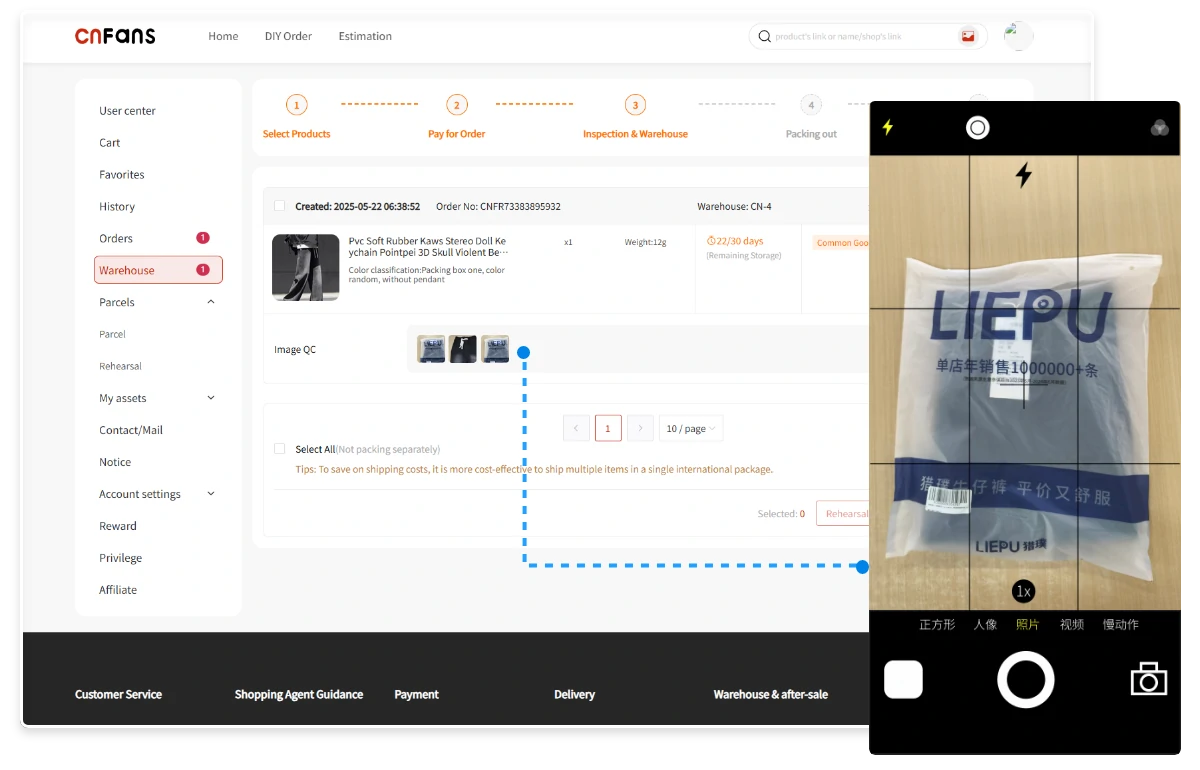
7. Select cleared items and request outbound shipping
Select only the Warehouse items you intend to send together, then check the destination, storage status and outbound eligibility. The demonstration shows the item checkbox, Rehearsal Packing and Submit. Resolve an Expired status or other restriction before relying on the selection. Confirm any rehearsal, packing or storage charge separately.
Choose the cleared items for a parcel and compare eligible international lines for that destination and contents. The account may first quote estimated freight or offer rehearsal packing. Check the final packed measurements and settlement; do not assume a universal order for quotation, packing and payment.
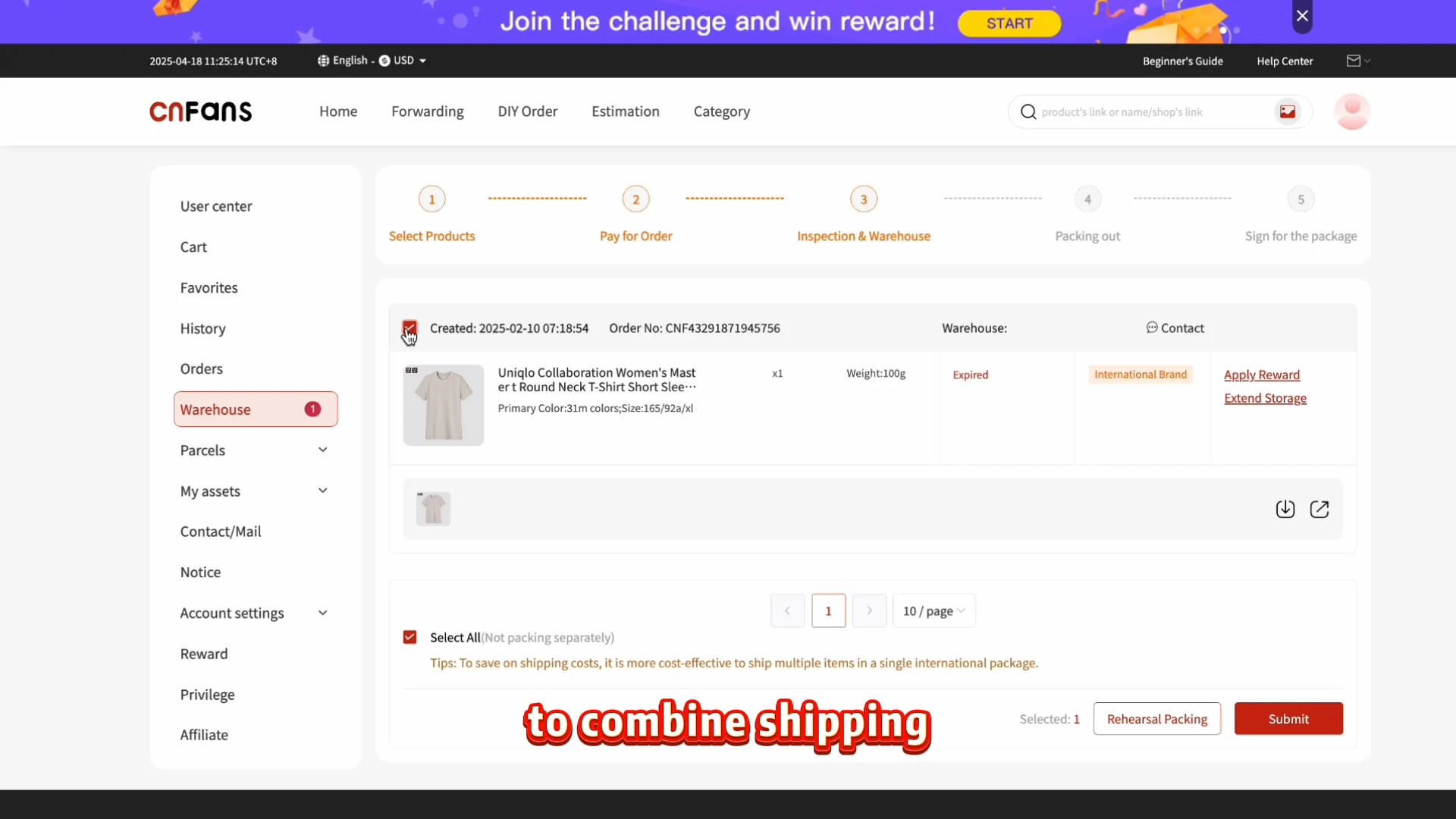
8. Choose the route and pay international freight
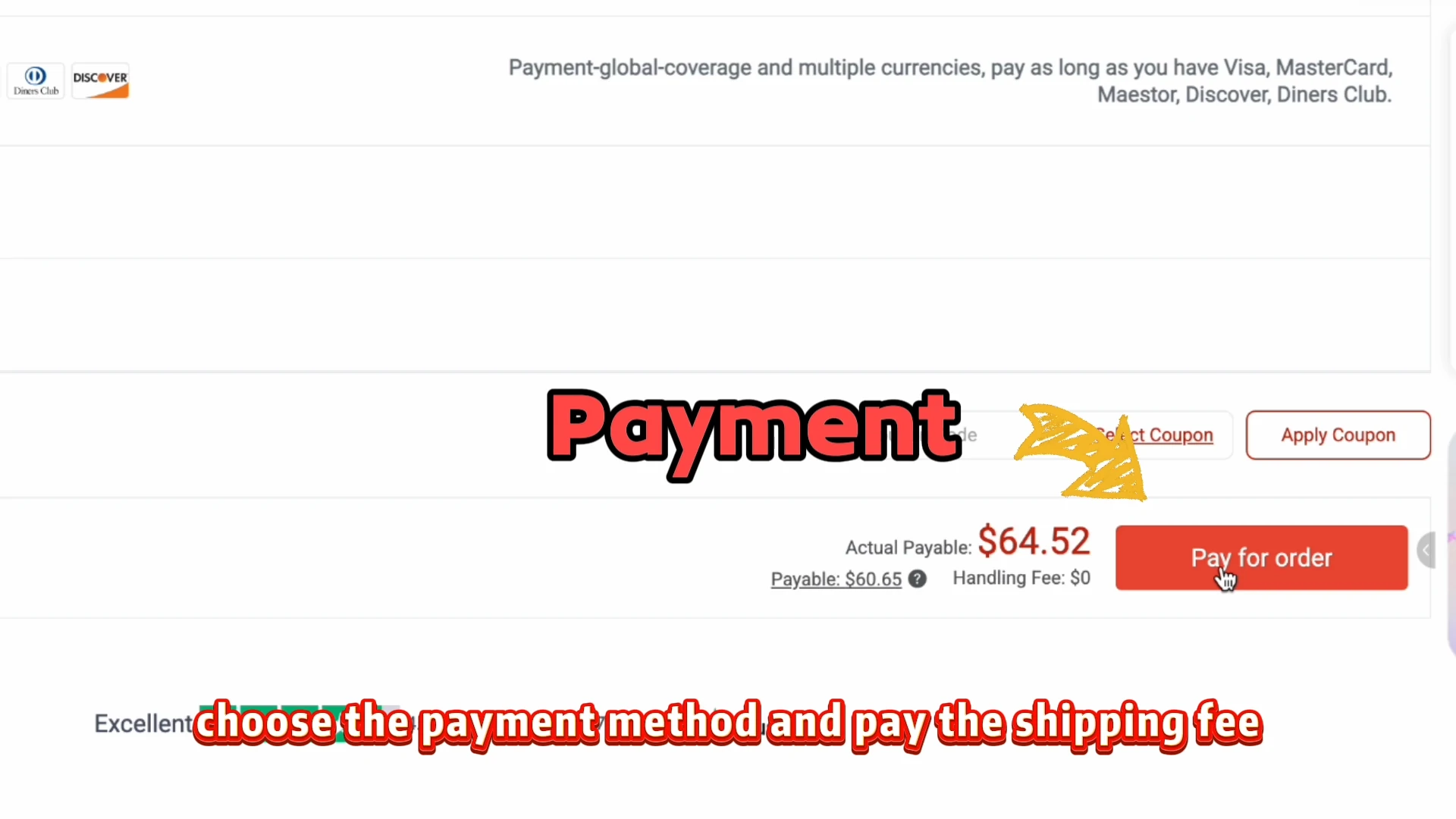
After the outbound request, compare the lines actually offered for the destination and contents, then review the shipping bill before paying. Check the chargeable weight or volume, packing and any optional service. An initial estimate may change after packing; keep the quotation, settlement and parcel reference.
Packing choices change the weight. Shoe boxes, hard bag inserts and hanger packaging all add grams and centimetres; many buyers ask for them to be removed. Then comes the second payment, for the parcel, and a tracking number once it leaves.
9. Follow the parcel after dispatch
After dispatch, use Parcels and the assigned tracking information to follow the shipment. A paid freight bill or submitted request alone does not establish that a carrier has the parcel. Keep the parcel ID, dispatch record and tracking number together; ask the agent to investigate an unexplained delay rather than inferring a location from silence.
Near the end, a courier or postal service in your own country takes over. That carrier may contact you about import tax or duty before it delivers; what applies depends on your country and the parcel, and you are the importer. Pay only through the carrier’s own site or app.
Keep the records until the parcel is open and everything fits: the listing screenshots, the warehouse photos, the outbound weight and the tracking number. Opening the parcel with your phone recording is a habit some buyers swear by, because it shows what arrived before anything was moved.
If you already have an order with CNFans
If your items were in the CNFans warehouse when the maintenance letter went up, the letter gives one route: the service email printed on it. Send it from the inbox tied to your CNFans login, put your username and any order numbers in the first lines, and say plainly what you need, whether that is the status of an item or how your stored items will be handled.
Keep a copy of every message you send and receive. Check the cnfans.com front page now and then for a change, and treat any instruction about your orders that does not come from the CNFans address or site with caution.
One longlist, three different decisions at the warehouse
Consider a longlist containing a jacket, a pair of trainers and a personalised jersey. They may be ordered together, but they need separate release decisions. A good jacket photo does not approve the shoes or the printed name on the shirt.
| Item | Evidence to resolve | Before parcel selection |
|---|---|---|
| Jacket | Selected colour, label, chest and length | Resolve the fit question or request a clearer measurement. |
| Trainers | Both shoes, matching labels, requested insole measurement | Confirm whether the box stays and how that affects the quote. |
| Personalised jersey | Exact name, number and printing position | Check the seller’s specific return terms before purchase. |
If the jersey is unresolved, leave it out of the parcel selection rather than marking the entire longlist ready. Record the warehouse storage date of the other items and compare any waiting cost with splitting the parcel. The trimmer organises your budget and weight estimates; it cannot know current storage deadlines, seller acceptance or the chargeable packed weight.